
The DJI Osmo Pocket 3 is one of the most capable pocket gimbal cameras available. It packs a 1-inch CMOS sensor, three-axis mechanical stabilisation, and 4K/120fps video into a pocketable body. For vloggers and content creators, that is a genuinely powerful combination. However, its built-in 1300mAh battery has one real limitation: it runs out. At $79, the official DJI Osmo Pocket 3 Battery Handle promises to fix that problem while adding useful functionality on top. This review covers every spec, every feature, and every practical consideration so you can decide whether it belongs in your kit.
What Is the DJI Osmo Pocket 3 Battery Handle?
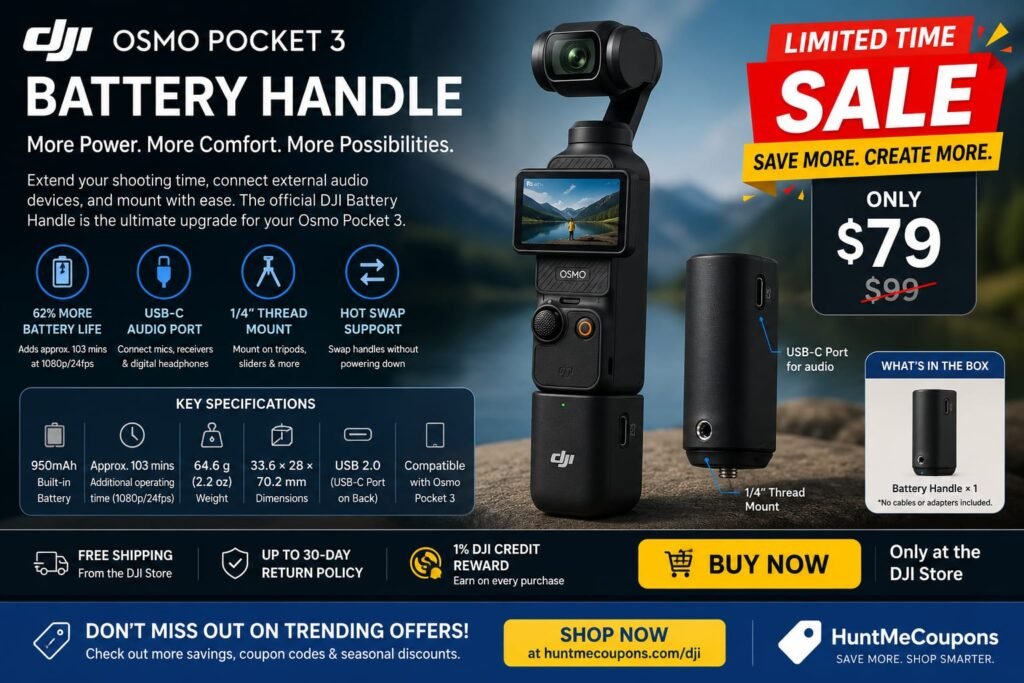
The Battery Handle is an official DJI accessory designed specifically for the Osmo Pocket 3. It attaches to the base of the camera and serves three purposes. First, it extends battery life. Second, it adds a more ergonomic grip. Third, it opens up connectivity for external audio devices.
It sells separately at $79 from the DJI Store. The box contains only the Battery Handle itself no additional cables or adapters are included. The product code is CP.OS.00000304.01.
Key Specifications at a Glance
Here are the confirmed specs directly from DJI’s official store listing:
- Price: $79
- Built-in battery capacity: 950mAh
- Operating time increase: approximately 62% when connected to Osmo Pocket 3
- Additional operating time: approximately 103 minutes at 1080p/24fps
- Weight: 64.6 g (2.2 oz)
- Dimensions: 33.6 × 28 × 70.2 mm
- Connectivity: USB-C port on the back
- Mounting: 1/4″ thread at the bottom
- Hot swap support: Yes
- Compatibility: Osmo Pocket 3
Battery Life: The Core Reason to Buy
The Osmo Pocket 3’s built-in 1300mAh battery lasts 166 minutes under controlled test conditions at 1080p/24fps with Wi-Fi off and the screen off. In real-world use, that figure comes down. An active touchscreen, face tracking, and higher frame rates all accelerate drain.
DJI’s testing shows the Battery Handle adds approximately 103 minutes of operating time at 1080p/24fps. That represents a 62% increase over the base battery alone. In practical terms, this extends a shooting day significantly. Instead of reaching for a charging cable mid-afternoon, you keep shooting.
For anyone who has watched the battery percentage drop faster than expected during a shoot, that extra runtime is the entire argument for buying this accessory.
The 62% figure comes from laboratory testing at 25°C (77°F). Real-world results will vary. Shooting at 4K/60fps drains both batteries faster than test conditions suggest. However, the proportional benefit of the Battery Handle remains consistent regardless of shooting mode.
Hot Swapping: A Practical Advantage
One of the Battery Handle’s most useful features is hot swap support. Hot swapping means you can disconnect and reconnect the Battery Handle without powering down the Osmo Pocket 3. In practice, this allows you to swap a depleted handle for a freshly charged one mid-shoot. You do not lose your session or miss a moment.
This matters more than it might initially appear. The Osmo Pocket 3’s built-in battery is not user-replaceable. Once it is empty, you need to charge the camera or stop shooting. The Battery Handle, by contrast, charges independently via USB-C. Consequently, a spare handle charged in advance gives you a field-swappable power reserve with no downtime.
The Battery Handle can charge without the Osmo Pocket 3 attached. DJI recommends the DJI 65W portable charger or the DJI 30W USB-C charger for this, though both are sold separately.
USB-C Port: External Audio Made Simple
Beyond battery life, the Battery Handle adds a USB-C port on its back panel. This port connects external audio devices to the Osmo Pocket 3. Compatible devices include digital wired headphones, wired microphones, and wireless microphone receivers.
The Osmo Pocket 3 already has three built-in microphones and delivers solid audio out of the box. However, external microphones give creators more control over audio capture, particularly in noisy environments or during interviews. The Battery Handle’s USB-C port makes that connection possible without additional adapters.
One important limitation: the Osmo Pocket 3 Battery Handle supports USB 2.0 only. When connected to a computer or phone for file transfer, speeds are limited to USB 2.0 standards. For creators who transfer large 4K files regularly, a direct connection via the Osmo Pocket 3’s own port or a fast microSD card reader remains the better option for high-volume transfers.
The 1/4″ Thread: Expanding Your Setup
The 1/4″ thread at the bottom of the Battery Handle is a small but genuinely useful addition. It allows the Osmo Pocket 3 to mount on tripods, sliders, and mini ballheads using the universal 1/4″-20 thread standard.
Without the Battery Handle, the Osmo Pocket 3 is primarily a handheld tool. Adding the handle transforms it into a camera that also mounts stably for interview setups, static time-lapses, or slider B-roll. This expands the camera’s creative range without requiring a separate cage or adapter.
For creators who mix handheld and mounted shooting, the 1/4″ thread alone provides a meaningful workflow advantage. It is a benefit that goes beyond the battery extension.
Design and Ergonomics
The Battery Handle weighs 64.6 g light enough to keep the Osmo Pocket 3 genuinely portable. The combined weight of the camera body (179 g) and the handle (64.6 g) comes to approximately 243.6 g. That remains comfortable for extended handheld use.
The handle measures 33.6 × 28 × 70.2 mm. It adds meaningful length to the camera’s grip area. The Osmo Pocket 3 on its own is compact to the point of being slightly small for larger hands during extended holds. The Battery Handle corrects this. It provides a more natural grip length and makes one-handed operation more comfortable across longer shooting sessions.
The handle attaches and detaches cleanly. Because the connection point also handles power transfer, the fit is firm and stable. This matters during handheld movement. A loose accessory would introduce vibration or shift into the footage. In practice, the Battery Handle feels like part of the camera rather than a separate add-on.
Cross-Compatibility with the Osmo Pocket 4
DJI has confirmed that the Osmo Pocket 3 Battery Handle and the Osmo Pocket 4 Battery Handle can be used with either device for charging. This is useful context for creators who may upgrade to the Osmo Pocket 4 and want to know whether this accessory carries over.
However, limitations apply. When the Osmo Pocket 4 Battery Handle connects to the Osmo Pocket 3, the handle’s battery level cannot display on the touchscreen. Additionally, due to differences in USB port standards, compatibility may be limited for data transmission, audio passthrough, and device wake-up features. For full functionality, using the Battery Handle that matches your camera model is the safest approach.
Charging the Battery Handle
The Osmo Pocket 3 itself charges fast. The built-in 1300mAh battery reaches 80% in 16 minutes and 100% in 32 minutes using a DJI 65W PD charger. The Battery Handle charges separately via its USB-C port. DJI recommends the DJI 65W portable charger or the DJI 30W USB-C charger for the handle as well, though neither is included in the box.
The ability to charge the handle independently from the camera is a practical advantage. You can top up the Battery Handle overnight while the camera charges separately. Alternatively, you can keep a second Battery Handle on the charger during a shoot and swap it in when the first depletes. Either approach eliminates the need to stop shooting and wait for a combined charge cycle.
When the Battery Handle connects to the Osmo Pocket 3, the camera’s touchscreen displays the handle’s remaining battery level alongside the camera’s own battery level. This gives you a clear picture of total available power at a glance. However, note that this display only works correctly when using the Osmo Pocket 3 Battery Handle specifically. If you connect the Osmo Pocket 4 Battery Handle to an Osmo Pocket 3, the handle’s battery level cannot display on the touchscreen.
Setting clear expectations matters. The Battery Handle cannot power on the Osmo Pocket 3 and automatically start recording with a button press. That is a setting within the camera itself specifically the option to begin recording when you rotate the screen. It is not a function the Battery Handle controls.
The handle also has no audio input or output capabilities of its own. The USB-C port passes audio connectivity through to the Osmo Pocket 3, but the handle does not process audio independently. As noted above, the USB 2.0 limitation makes it a poor choice for high-speed file transfers.
Who Should Buy the DJI Osmo Pocket 3 Battery Handle?
The Battery Handle makes the most sense for four types of Osmo Pocket 3 users.
Daily vloggers and travel creators who shoot for extended periods without reliable charging access will benefit most. An extra 103 minutes at 1080p/24fps is the difference between a full day of content and running out mid-afternoon.
Creators who use external microphones will find the USB-C audio connectivity genuinely useful. If you own a DJI Mic system or a USB-C compatible microphone, the Battery Handle unlocks that connection without additional adapters.
Tripod and mounted shooting users gain the 1/4″ thread, which opens the Osmo Pocket 3 to standard mounting accessories. This expands the camera’s versatility for interview setups and static shots.
Anyone who values field flexibility will appreciate hot swapping. A second Battery Handle, kept charged, gives you effectively unlimited shooting time without returning to a charging cable.
The Battery Handle is less essential if you shoot short clips, have reliable charging access throughout the day, or shoot exclusively handheld without external audio.
Price and Value
At $79, the Osmo Pocket 3 Battery Handle is straightforward to evaluate. A 62% battery increase, audio connectivity for external microphones, a tripod mount thread, and hot swap support are four genuine capability upgrades in a single 64.6 g accessory.
The Battery Handle ships with free shipping from the DJI Store and qualifies for DJI’s up-to-30-day return policy. It also earns a 1% DJI Credit Reward on the purchase price, which applies as store credit toward future DJI purchases.
For anyone who regularly pushes the Osmo Pocket 3 close to its battery limits, the $79 investment pays back quickly in recovered shooting time. For occasional users who rarely shoot past the 90-minute mark, the value case is less urgent.
Final Verdict
The DJI Osmo Pocket 3 Battery Handle is not a flashy accessory. It does not add new shooting modes or change the camera’s optical capabilities. Instead, it solves the camera’s most practical limitation battery life while adding grip comfort, audio connectivity, and mounting flexibility in one lightweight package.
At $79, it is a focused, well-executed accessory that delivers exactly what it promises. If you own an Osmo Pocket 3 and battery life has cut a shoot short, the Battery Handle is worth buying. The 62% extension, hot swap capability, USB-C audio port, and 1/4″ thread together make the Osmo Pocket 3 a more capable and reliable production tool.
Shop the full range here DJI & Don’t miss out on trending offers check here https://huntmecoupons.com/store/dji/ for more savings, coupon codes, and seasonal discounts.
